
HealthTech · SaaS
AI-assisted operating room management platform for hospitals
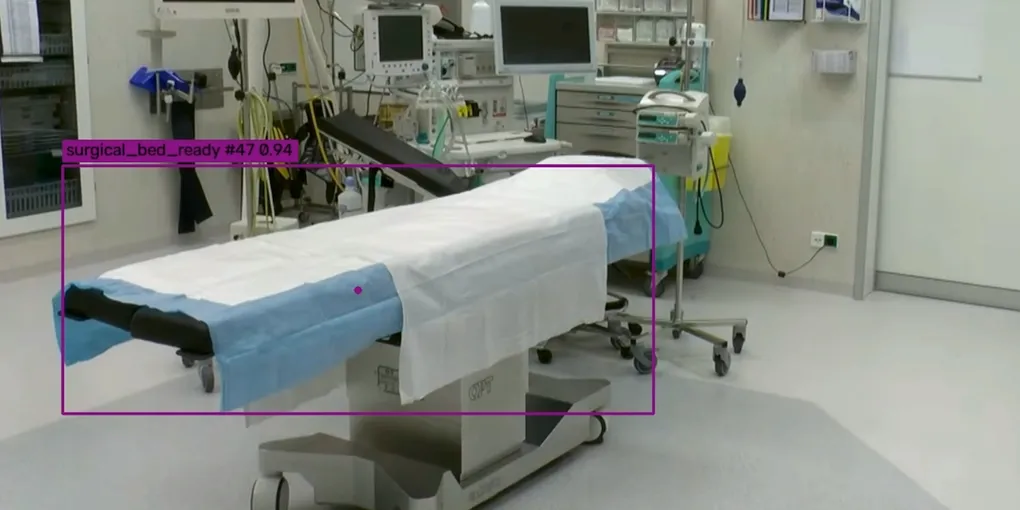
Multi-tenant SaaS covering a patient's journey through surgery, from pre-op to recovery. I owned the backend, cloud infrastructure, and web frontend. I also designed a computer vision system that detects operating room events from on-site cameras, with all video processed locally.
Overview
The platform is a multi-tenant SaaS for hospitals. It covers the whole surgical process, from a patient checking in before a procedure to their recovery after. Surgical and hospital staff use it every day, and it works without storing any patient-identifying data.
I joined an existing team of six engineers spread across several time zones. Fairly quickly I had full ownership of the backend, Google Cloud architecture, and the web frontend. Later I also designed a computer vision system, which is covered below.
What I built
- Pre-op status board. Each pre-op bay maintains the stage the patient is at, which can be managed by multiple interfaces (e.g., dedicated device, NFC tags). A dashboard shows the summary of all bays in a room, which updates in real-time as data changes. I built this from scratch: data model, UI, and real-time communication.
- Real-time updates. Since there are multiple devices in the system, every board and status in the product has to update the moment anything changes, no matter who made the change. The WebSocket layer behind this was basic and hadn’t kept up as the product grew. I streamlined it so it could handle more features and more traffic reliably.
- Surgeon preference cards. A system where surgeons define how they want the room, instruments, and supplies set up for each kind of procedure, so the staff can prepare without asking.
- AI queries. Staff can ask the system questions and get answers from the hospital’s own data, such as what a surgeon wants on their preference card. Staff ask in plain language and get a short, direct answer.
- Frontend migration. Moved the frontend from Django templates with plain HTML and JavaScript to React and TypeScript, in phases, so the team kept shipping features throughout.
- Computer vision for operating room events. Until now, events like cleaning started, room ready, patient in, patient out, and door openings were tracked through NFC tags, contact sensors, and staff tapping or speaking to a device. These events trigger alerts (e.g., room ready notifies the surgeon) and feed the metrics management uses to improve quality and turnaround. I designed a system that automatically detects these events using the existing CCTV cameras instead, with all video processed on site, so the data no longer depends on someone logging it.
Key decisions
Keep patient-identifying data out of the system. Instead of storing PHI and building compliance around it, the data layer was designed so that nothing identifiable is stored at all. The product still delivers everything it’s meant to, and hospitals have far less privacy and compliance work to do.
Process video on site, not in the cloud. For the computer vision system, sending camera feeds to the cloud was ruled out early. Keeping all video inside the hospital’s own network is better for privacy and security, avoids the latency and cost of streaming video out, and makes the system far easier to pitch to hospitals, since their footage never leaves the building.
Migrate the frontend in phases, not all at once. The plain HTML and JavaScript frontend was hard to make interactive and getting harder to maintain and upgrade. A full rewrite to React and strictly typed TypeScript would have blocked me for weeks, including on parts of the app that were rarely used. So I made the two frontends work side by side, with no visible difference to the user when moving between a legacy page and a React one, and migrated the most heavily used parts first. That delivered the most value in the least time, and the rest could follow as needed.
One WebSocket, scoped by authentication. When I joined, there were several WebSocket endpoints with little in the way of authentication or control over who could send what. The design was confusing and repeated itself in places, which made the frontend integrations messy too. I merged everything into a single endpoint where the backend does the gating and the heavy lifting. Each consumer gets exactly what it’s allowed to see, with almost no conditional logic on the client side.
How it went
Everything described above is in production and in daily use, with the computer vision system live at its first few sites. I started as one of six engineers on the team and ended up as the software architect and lead developer, owning the backend, the cloud setup, and the web frontend, along with much of the technical planning. Fairly early on I was in every core call with the client and looped in on anything that touched the technical side.
What I’m most pleased with is how reliably it all runs. The real-time layer, the frontend migration, and the computer vision system each replaced something fragile or manual, and staff use them every day without having to think about them.
- Built with
- Django, Django Channels, Celery, PostgreSQL, Redis, React, TypeScript, Google Cloud Platform, RF-DETR, Gemini Agent Platform (formerly Vertex AI)